Switch family parameter
|
|
Switch family parameter |
This command allows you to select a family according to a enumeration parameter, a switch enumeration parameter or a user enumeration parameter.
Creation stages / Use:
Click the icon or select the Construction> Parameters > Other Parameters > Switch Family Parameter... command from the drop-down menu.
Enter the name of the parameter.
Choose the enumeration from the drop-down list.
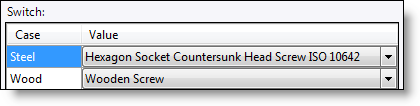
In the switch table, select the family to use for each enumeration value.
Enter a default value.
|
|
Family document to use must be opened in order to be selectable in this list. |
|
|
Example: The user wishes match a screw family to the material step he is building (steel screw for steel step and wood screw for wood step). He will create an enumeration document containing two values to these materials (steel and wood). Then he will create a user enumeration parameter using the enumeration document create just before. And finally create the switch family parameter with the user enumeration parameter and select family to use according to step type.
|