Switch code parameter
|
|
Switch code parameter |
This command allows you to select a family code according to a enumeration parameter, a switch enumeration parameter or a user enumeration parameter.
Creation stages / Use:
Click the icon or select the Construction > Parameters > Other Parameters > Switch Code Parameter... command from the drop-down menu.
Enter the name of the parameter.
Choose the enumeration from the drop-down list.
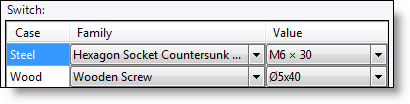
In the switch table, select the family and code to use for each enumeration value.
Enter a default value (family and code)
|
|
Family document to use must be opened in order to be selectable in this list. |
|
|
Example: According to the material of a step stair user want to use a steel screw M6 x 30 or a wooden screw M5 x 40. He will create an enumeration document containing two values to these materials (steel and wood). Then he will create a user enumeration parameter using the enumeration document create just before. And finally create the switch code parameter with the user enumeration parameter and select family and code to use according to step type.
|