Parameters
Entities tree
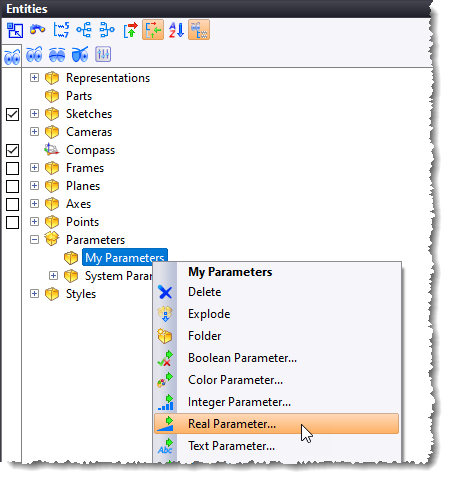
It is possible to create a parameter from the context menu of a subfolder of the Parameters folder.
New functions
- choose(val; test1; val1; test2; val2; ...; valDefault)
Returns val1 if val < test1, then val2 if val < test2, etc. otherwise returns valDefault
- switch(cond1; val1; cond2; val2; ...; valDefault)
Returns val1 if condition cond1 is true, otherwise val2 if condition cond2 is true, otherwise returns valDefault
Text parameter
- Upper: converts all characters to uppercase
- Lower: converts all characters to lowercase
- fillLeft: adds characters on the left of the character string.
- fillRight: adds characters on the right of the character string.
- Replace: replaces one character string by
another
Example:
Let two text parameters be A = "Design" and B = "7.19"
Parameter Formula Result C =upper(A) DESIGN D =lower(A) design E =fillLeft(A; "TopSolid'";15) TopSolid'Design F =fillRight(E;B;19) TopSolid'Design7.19 G =replace(F;B; "2025") TopSolid'Design2025
Surface area parameter
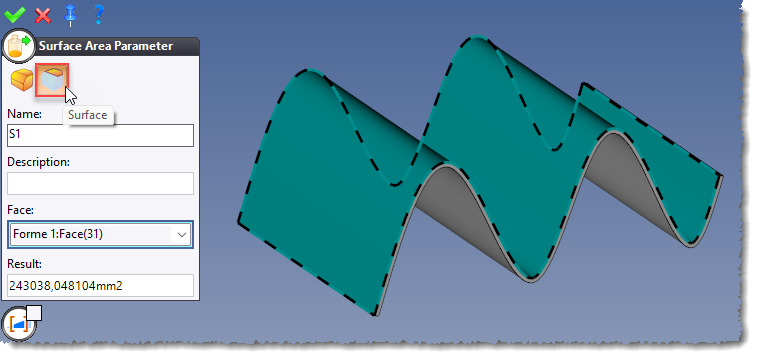
The Surface mode has been added to the Surface Area Parameter command. It allows the selection of a face on a shape.
Description
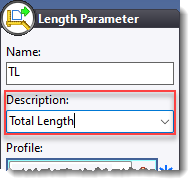
The Description field has been added to all parameter creation commands.
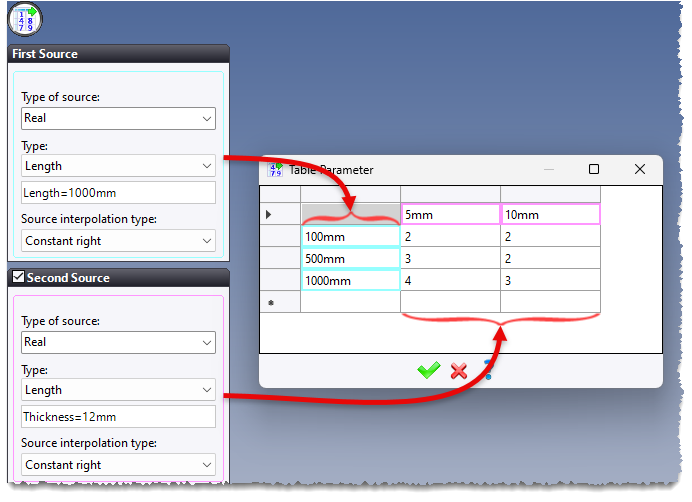
- Table Parameter
- Tabulated Integer Parameter
- Table Enumeration Parameter
- Table User Enumeration Parameter
- Table Text Parameter
- Table Material Parameter
- Table Coating Parameter
- Table Finishing Parameter
The Table Family Parameter and Table Code Parameter commands also feature two data sources.