Mold
Designing a large-scale mold often involves creating a substantial number of parts. After these parts are synchronized in the Mold document, the modeling and management phase can become lengthy and complex.
To streamline this process, you can use the  Mold command to create a mold
sub-section as a new
Mold command to create a mold
sub-section as a new  Mold document. This secondary document
is integrated into the main mold by creating an assembly context, which links the
sub-section to selected parts of the main mold.
Mold document. This secondary document
is integrated into the main mold by creating an assembly context, which links the
sub-section to selected parts of the main mold.
In each sub-mold, the created parts support associative design, without being synchronized in the main mold.
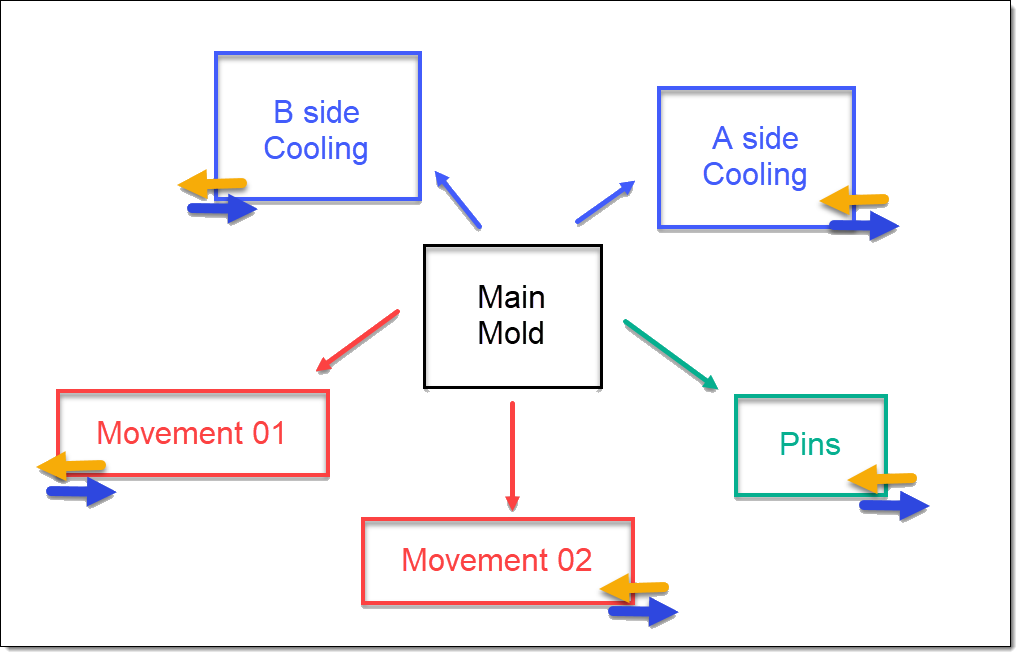
You can create operations using the entities available in the assembly context. However, these operations are not updated automatically; you must manually refresh the context in the Entities tree to update them.
This feature significantly improves collaborative work, as it allows multiple users to work simultaneously on different sub-sections of the same mold.