 Exercise 1 - Get or create a TopSolid project
Updated : 25 November 2025
In this exercise, you will learn how to locate an existing project and create a new one if needed.
Note
After downloading the Automation_SelfLearning solution from GitHub, you will find the whole example code for this exercise in the Exercise_1 project.
Important
You will find more information about TopSolid'Pdm on this page.
- Set up your environment.
- Launch Visual Studio
- Open the project Automation_SelfLearning project to begin coding your own application.
Design the Application Interface
Open the design form of your application.
Add a Textbox and a Button to the form as shown below:
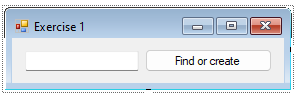
- Add a Button Click Event
- Double-click the button on the form to generate a click event handler.
- Implement the click event method to search for a project in the current PDM by its name, specified in the textbox.
- Coding Steps
- Ensure the following functionalities are included in your method:
- Close any open projects or libraries.
- Search for projects with names matching the textbox input.
- If a match is found, open the project.
- If no matching project exists, create a new project with the given name and open it.
Note
TopSolidHost.Pdm.SearchProjectByName(string) method returns projects whose name contains searched string.
Test your application.
From the Debug menu, select Start Debugging to run your project.
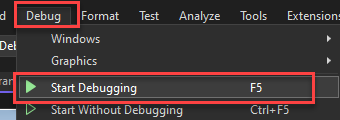
Click the button on your form to execute the functionality
Self-Learning exercises table of content:
- Exercise 2 - Create a shape
- Exercise 3 - Create an assembly
- Exercise 4 - Export / Import a document using STL format