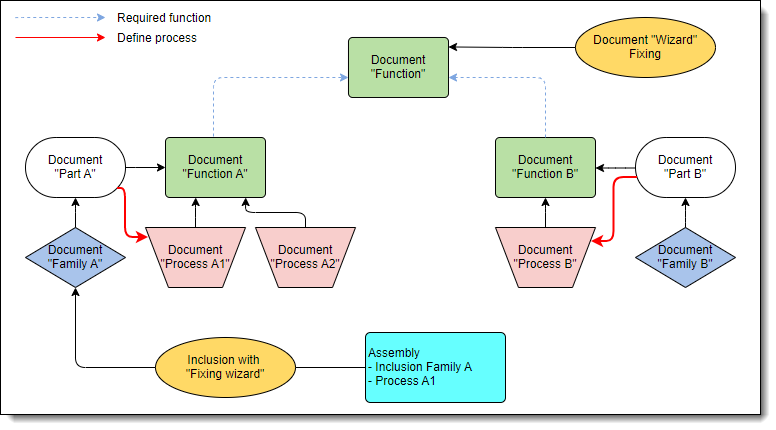
Defining a process on a generic will also have the effect of applying this process by default without opening the process dialog when a component has several processes.
|
Define process |
This command allows to associate a process to a generic component.
It will then be possible to replace a component A and its process by a component B and its process.
Creation stages / Use:
Select the Tools > Processes > Define process... command from the drop-down menu.
Select the function document referenced by the component.
Select a process document created from the above function.
|
Defining a process on a generic will also have the effect of applying this process by default without opening the process dialog when a component has several processes. |
|
The above construction will allow to replace the component A with its process A1 by component B with its process B |
|
Creating a higher level function used as a required function in Function A and Function B will allow to use the same wizard (created from the higher level function) for components A and B and thus preserve the positioning when replacing. |