Table tolerance parameter
|
|
Table tolerance parameter |
This command allows you to create a tolerance parameter changing either linearly or by intervals, depending on a source parameter.
Creation stages / Use:
Click the icon or select the Construction > Parameters > Other Parameters > Table Tolerance Parameter... command from the drop-down menu.
Choose the parameter type.
Enter the name of the parameter.
Choose the standard to use.
Choose the source type.
Enter the source value, an expression, or click on an edge.
Fill in the table.
Select the interpolation type (linear interpolation will not be available for table tolerance parameter).
This command is very useful for creating a changing tolerance parameter depending on another parameter.
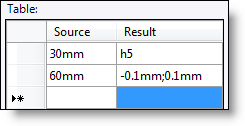
For example: If the part has a diameter less than 30mm, we use the shaft tolerance h5, if the diameter is between 30 (not included) and 60, we use a manual tolerance [-0.1 0.1mm], etc ...
In this case, the parameter to create is the table tolerance parameter, the type of parameter is a length, the standard to use is "Shaft Tolerances ISO 286-2", the type of source is a length, the value of the source is the diameter of the part (edge, parameter, etc.). Fill the table as below, the interpolation will be Constant right.