Vector Profile


Links / Videos :


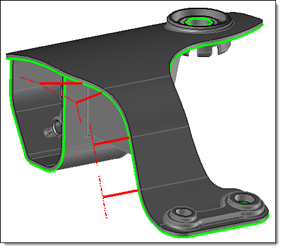
This command creates a vector profile from a selected point on a parting edges path.  The profile will be orthogonal to the molding axis or tangent to the faces connected at this point.


Creation stages / Use:


Click the icon or select the Split > Vector Profile... command from the drop-down menu.


  1. Select the vertex from which to create the vector profile, and the edges to orient it.

  2. Determine the parameters defining the vector.

  3. Add or not Extremity profiles.

  4. Validate .


Only vertices belonging to a Parting edges path can be chosen.


Available options:


  • Vertex: Select the origin vertex of the created vector.
  • First edge: The created vector is orthogonal to the selected edge.
  • Second edge:  With selecting a second edge, the created vector is the bisectrix of these two edges.


  • Mode: Several creating modes are available:
    • Superior face: the vector direction will be tangent to the superior face of the parting edges path.
    • Molding axis: the vector direction will be orthogonal of the molding axis.
    • Inferior face: the vector direction will be tangent to the inferior face of the parting edges path.
    • Direction: It is possible to create the profile based on a given direction.
  • Limit: It allows you to give the length of the created vector.
    • Length : Set the vector length.
    • Stock plane:The software will "end" for you the Vector on the Design external planes of your Stock.
    • Plane: You select a plane that will "end" your Vector. If this plan doesn't exist, create it "from scratch" .

  • Molding axis: It allows you to give the molding axis. The opening frame is selected by default.
  • First rotation angle: This angle is modifiable only in case of the vector was created in Molding axis mode. By default, it is set to 90°, to create the vector orthogonal to the molding axis. It is possible to set its value with moving the graphical arrow.
  • Second rotation angle: It is possible to set a rotation (around the molding axis).
  • Reverse: This option allows you to reverse the created vector. The priority sense is the "outgoing" sense of the part.


The vector direction is a combination of two options:

  • orthogonal to the molding axis or tangent to the faces connected at this point.

AND

  • orthogonal to the selected edge, or middle of the 2 selected edges.


This optional option allows you to add tangent profiles at both edges defining the vector, at the end of the vector .

  • Length: It allows you to give the profile extremity lengths.
  • Reverse the first: This option allows you to reverse the first profile direction, direction given by the first edge.
  • Reverse the second:  This option allows you to reverse the second profile direction, direction given by the second edge.


Modifications / Additional information: