Contour
|
Contour |
The Contour command automatically allows a succession of lines and arcs to be created with coincidence relations.
Creation Stages:
Click the  icon or select the 2D sketch
> Contour... form the drop-down menu. In a Draft
document, select the Sketch
> Contour... form the drop-down menu.
icon or select the 2D sketch
> Contour... form the drop-down menu. In a Draft
document, select the Sketch
> Contour... form the drop-down menu.
Chose a creation mode of the segment, the Line mode is chosen by default.
|
Line |
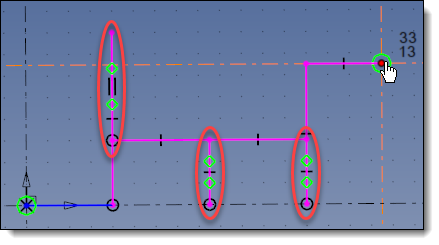
Creation of a line by two points. This mode contains 4 sub-modes allowing to move the cursor freely, horizontally, vertically or both.
|
|
Tangent arc |
Creation of an arc tangent to the last element of the contour. |
|
Perpendicular arc |
Creation of an arc perpendicular to the last element of the contour. |
|
Arc |
Creation of a circle arc by three points. |
|
Passing |
Creating a contour by passing over the existing geometries (edges of a shape, sketch, etc.). |
Enter passing points coordinates of the segment or click points in the graphic area.
A Coordinates relative to button on end point allows to give coordinates relative to sketch origin or relative to last vertex.
|
|
|
|
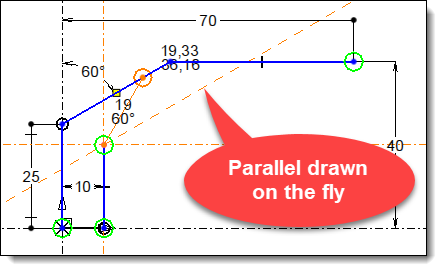
You can use the "A" key to switch from a line to an arc and vice versa. It allows to quickly create an obround. When creating a contour, if the cursor is placed on another linear segment, TopSolid draws a magnetic axis parallel to it, passing through the last point of the contour being created. A dimension is created automatically if you use this magnetic axis.
|
Available Options:
Lock:
|
This option allows to lock the interactive mode to stay permuted. For example, if you move the cursor to the last segment of a line in progress, TopSolid automatically switches to tangent arc. When the arc is done, it switches again to line. By checking this mode before position the arc, it will stay active and after position it another tangent arc is proposed.
|
Interactive:
|
This option allows to switch between different Line mode, Tangent arc and Perpendicular arc by moving cursor on the last edge of under construction contour.
|
Complementary arc:
|
By default, in the circle, tangent circle or perpendicular circle mode, the circle arc is created in the trigonometric direction (counter-clockwise), check the Complementary arc option to change to clockwise.
|
Mono-profile:
|
This option is available only if, in the sketch options, the Automatic profiles mode is enabled and the check for self-intersecting is disabled. It allows the creation of a single profile even when it contains areas of backtracking.
|
Length:
|
This option allows you to enter a value that will be assigned to the length of the segment. The corresponding dimension will be automatically added.
|
Additional Information / Modifications:
When a contour vertex is selected again, the construction mode is automatically enabled.

 :
The cursor can move freely in the sketch plane
:
The cursor can move freely in the sketch plane :
The cursor can move horizontally or vertically.
:
The cursor can move horizontally or vertically. :
The cursor can move horizontally only.
:
The cursor can move horizontally only. :
The cursor can move vertically only.
:
The cursor can move vertically only.