
|
|
Keyboard and shortcuts |
Location: General / Keyboard and Shortcuts
Previous / Next:
...
How to start using TopSolid'Cam
The keyboard allows you to quickly access a function without having to use the dropdown menu.
Below the basic functions:
|
Switch between Cam / Design |
< CTRL+W> |
|
Undo (Edit) |
< CTRL+Z> |
|
Redo (Edit) |
< CTRL+Y> |
|
Save Document |
< CTRL+S> |
|
Update All |
<Shift+F5> |
|
New Document |
< CTRL+N> |
|
New Project |
<CTRL+SHIFT+N> |
|
Home Page |
<CTRL+Q> |
|
Projects (File) |
<CTRL+SHIFT+O> |
|
Copy Part |
<CTRL+ Left Mouse Click> |
|
Refresh Millings (Replay) |
F5 |
|
Online Help |
F1 |
|
Global Zoom |
<CTRL+SHIFT+Z> |
|
Copy |
<CTRL+C> |
|
Paste |
<CTRL+V> |
|
Top View |
<CTRL+SHIFT+T> |
You can add user shortcuts using the Tools--> Customize function.
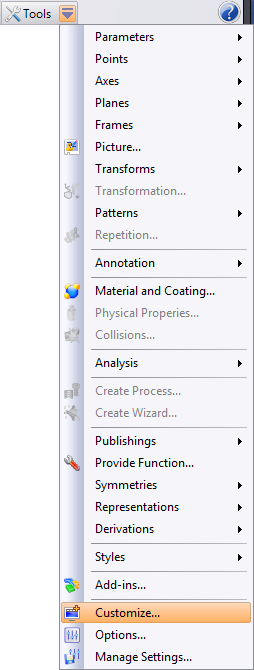
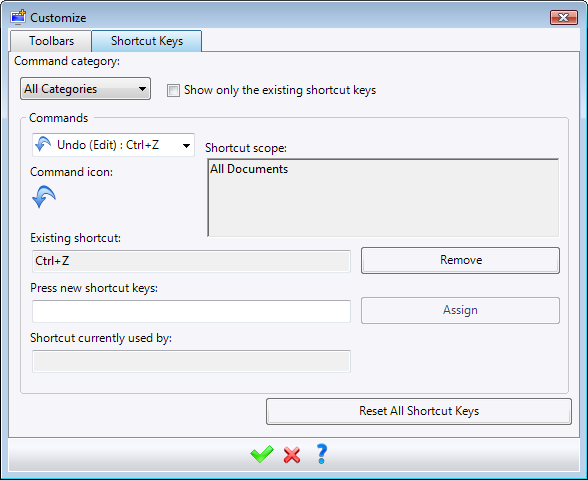
Select the command to customize from the desired category.
In the "Enter Shortcut" field, enter the new shortcut.
|
|
Resetting all shortcuts cancels all user customizations, but not the standard shortcuts installed with TopSolid (described at the top of this page).
|

