Check surfaces
Check surfaces are surfaces on the finished part that must not be touched by the tool during machining (such as the surfaces defining the parting line of a mold).
In this case the tool paths are offseted by the stock to leave (on the wall and on the floor) on the check surfaces to ensure that no traces are left on these surfaces.
To activate some check surfaces, simply check the box "Check surfaces" and then from the lis, select the surfaces on the part to protect.
All selected surfaces will be part of the same group.
In the example below there are three check surfaces with 0.1mm lateral offset and 0.5mm offset at the bottom.
Check surfaces management
Check surfaces
Offsets (XY:0,1mm; Z:0.5, mm) [3]
Settings
Lateral : 0.1mm
Bottom : 0.5mm
Geometry
Shape 1
Shape 2
Shape 3 |

|
Allows to add a new surface group, it is possible to use tools allowing a faster selection
 |
Extension that allows to select a face by choosing to extend some of its edges. |
 |
Root face which allows to select in one click all the faces directly adjacent to the selected face. |
 |
Blend face that allows to select the fillet faces directly adjacent to the selected fillet face. |
| |
Face by altitudes which allows to select a batch of faces at the same altitude. |
 |
Face by color which allows to select all the faces of the same color belonging to the same shape. |
 |
Face by tangent which allows to select all the faces tangent to the selected face. |
|
Face on edge path which allows to select all faces on an edge path. |
|

|
Allows to adjust the offsets that will be applied to all surfaces of the group. |

|
It is possible to reset the value when an offset has been modified on a check surface. |

|
Allows to delete a groupe of surfaces or a selected geometry in a group. |
 To add a geometry to a new group just double click on
  (geometry) in the group and then select the surface to add.
Be careful to check that the stocks to leave of the new group do not already exist.
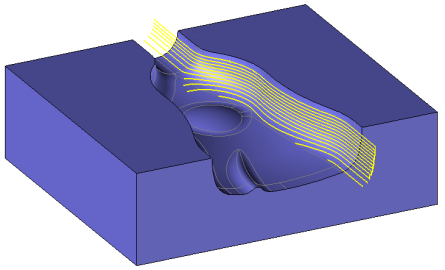
No check surfaces are selected so the milling is flush with the parting line and the edges may be rounded.
.
|
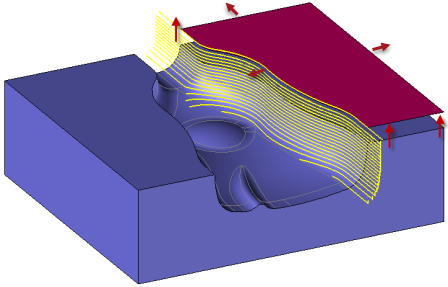
The check surface allows to extend the machining above the parting line.
|