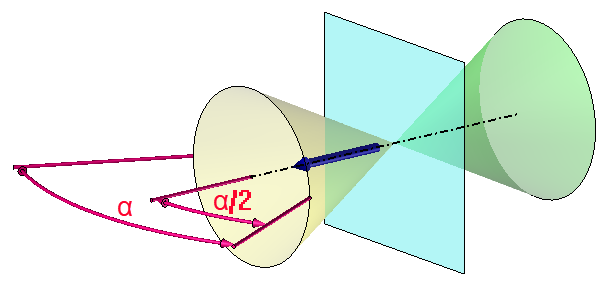
In blue (cyan): the sketch plane
In dark blue: the perpendicular direction of the sketch plane
In yellow: the defined visibility cone
In green: the reversed visibility cone
|
|
Visibility Cone |
This command allows to manage the display of the sketches during the view rotation and in the drafting.
For example, it allows you to display a sketch in the front view but not in the other views.
Creation stages / Use:
This command is available from the contextual menu (Others > Visibility Cone) on a sketch.
When the Activate option has been checked, give the visibility angle of the sketch.
Then the sketch will be displayed when the direction of the camera will be included in the defined visibility cone (in yellow in the image below):
|
|
|
In blue (cyan): the sketch plane In dark blue: the perpendicular direction of the sketch plane In yellow: the defined visibility cone In green: the reversed visibility cone |
|
|
This setting is not taken into account when the sketch is edited. |
Available options:
Both sides:
|
|
This option allows to symetrize the visibility cone according to the sketch plane. For example, it allows to display a sketch in the front and the back views but not in the other views. |
