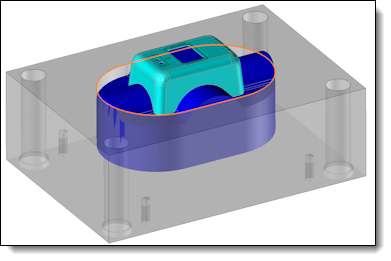
Cavity Process


Links / Videos :


This command allows you to create the processes of the selected core cavity blocks. A pocket will be created from a Section, with the block height. It is possible to create in the same operation fillets/chamfers on the blocks vertical edges and on the process.


Creation stages / Use:


Click the icon or select Mold > Cavity Process... command from the drop-down menu.


  1. Select the generating blocks of the process.

  2. Determine the section type to use, and the settings linked to this choice.

  3. Choose to create or not fillets/chamfers on the vertical edges.

  4. Validate .


Available options:


  • Blocks: A selection filter allows you to select only blocks.
  • Hide: This option allows you to hide the selected entities during the command, in order to select more easily other entities, especially those that were behind the first ones.


Two creation modes are available:

  • User: This mode allows you to choose a sketch drawn before, or create a new one with the "special inputs" .

  • Model: It is possible to choose a standard section from a template. Three models are available by default in TopSolid'Mold.It is possible to you to enrich this library with your own modeles.
  • Code : This option is only available if you choose a model. It allows you to choose the wanted code from the model family.
  • Frame: You need to choose the positioning frame of the component. For our models, the positioning frame matches to the section center. By default, the Core Cavity Block frame is chosen. If a multi cavity was done before, it will be the Multi Cavity Creation frame.


This option is only available if the section is creating by model.

  • Automatic: Regarding the dimensions of the selected blocks, computes automatically the values of the Width and Length parameters for a Rectangular block, and the Diameter parameter for a Circular one. If this option is chosen, the parameters becomes not available and can not be manually modified.

  • Drivers: List the drivers to set for the chosen section. If the automatic mode is chosen, only the additional drivers to the computed ones are modifiable.


Only the Automatic mode will update the drivers following the modification of the block dimensions.


It is possible to choose the treatment to apply on the blocks vertical edges regardless the one applied on the process vertical edges.

Three choices are available:

  • None
  • Fillet

  • Chamfer

You need to precise the value of the fillet Radius and the chamfer Distance.


  • Automatic Detection: This is a default choice. Only the plate on the same block side are selected.
  • Parts to process: If the Automatic Detection is unchecked, it is possible to choose manually the parts to operate with the process.


  • Create sketch: This option is only available with a creation of a section from model, with non automatic drivers. In case of the option is chosen, editing the Cavity Process operation will create a User section based on the chosen model during the Process operation creation. To modify it, it is needed to edit this new sketch.
  • Preview: Allows you to choose to display or not the Process previews and the operations realized on the blocks vertical edges.