Excel link
|
|
Excel link |
This command allows you to import or export values from the table of a family document from or to an Excel document.
Creation stages / Use:
This command can be launched from the contextual menu of the graphical area or from the table values.
Select the Excel document to use:
Select the action to perform:
Open: launch Excel and open the document in order to modify the values.
Import: import the values of the document Excel into the table values of the family document.
Export: export the table values of the family document in the Excel document.
Validate with the  button.
|
|
The parameter types must be real, integer, boolean, text, enumeration, user enumeration or code. Excel supported versions are : 2003, 2007, 2010 and 2013. |
Modifications / Additional information:
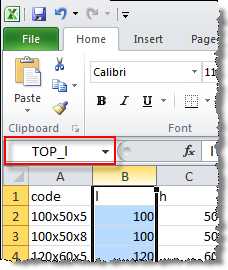
To be usable, Excel document columns have to be named by adding prefix TOP_ in front of the parameter name is shown below:
|
|
|
Example: The named cell TOP_l allows you to drive the l or L column of the table value |
|
|
The Code column should be named TOP__TopSolid.Kernel.TX.Properties.Code. |