|
|
Tolerance |
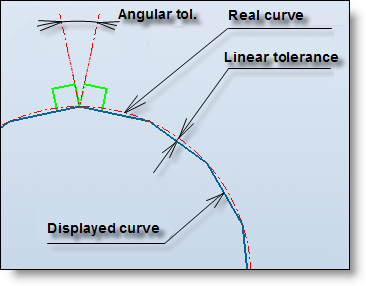
This command allows to modify the linear tolerance of an unfolding operation. In some cases, especially when there are very small edges, the unfolding sketch calculation can failed.
Creation stages / Use:
Select the Tolerance...contextual command from the unfolding in the operations tree of an unfolding document.
Enter the value of the linear tolerance (0.01mm by default).
Enter the value of the angular tolerance (0.05° by default).
Validate.
|
|
|
|
The more the tolerance is precise, the more the geometry will be precise. The default value is a good compromise between the geometry precision and the performance. |
|
|
A smaller tolerance (for example 0.001 instead of 0.01) produces longer computation time. If the modeling tolerance is modified in the document options, manually modified tolerances with this command will not change. |

