
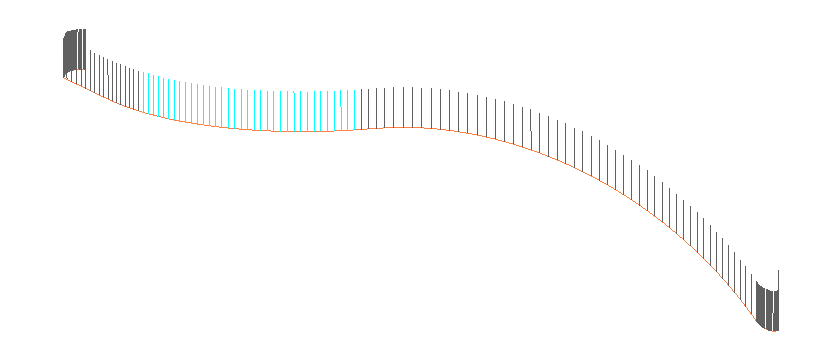
 To edit the normal of a 5 axis operation simply right click on the operation in the operation manager and select the option "normals modification".
|
Link movements Methods Measure the distance between the tool and the part.. Search Misc operations Show/hide normals Edit a technological point... Machining details... Change the program Display options... Generate ISO... Settings of operation Edit Normals modification
|
The normals modification is apllied on the group which is selected.By default if we don't create a selection group, we apply the modification on all the normals.
Before applying a normals modification make sure that :
- The selection group has normals to modify and is well defined in the area : selection group
- The good selection group is selected in the area : Parameters modification 
 The icon normals modification allows then to manually modify the normals calculated by TopSolid.
|
Normals modification Normals modification
Value Radial rotation Axial rotation |
 |
It allows to update the modifications made on the selected normals in the graphical area. When the background of the button is orange the normals are up to date in the graphical area. |
|
 |
It allows to add a type of modification on the selected normals.
|
|
 |
Delete a configuration |
|
 |
Desactivate a type of modification : - - |
|
 |
It allows to visualize in a graphic the angular variations of the normals. |
The icon "parameters modification" groups the different groups of selected normals and allows then to select the normals to modify.
|
Parameters modification All the normals All the normals Selection group 1 * New selection |
The icon "selection group" allows to modify and remove groups.
|
Selection group All the normals Selection group 1 Selection group 2 |
 |
It allows to create a new group. |
|
 |
It allows to modify the selection of the normals in a group :
"Select by length" will select all the normals which have a distance to a point lower than a given value. "Type intervals" will directly gives the index of the normals with the form [4 ; 8][9 ; 52][89 ; 89]. |
|
 |
It allows to delete a group. |
|
 |
It allows to intersect several groups (in order to have this option active simply select at least two groups with the button of the keyboard "Ctrl"). |
|
 |
It allows unit several groups (in order to have this option active simply select at least two groups with the button of the keyboard "Ctrl"). |
 By default all the normals are selected for modifications (the selected normals are colored in cyan). To only select some of the normals simply click on it or select them with the window mode.
 In the general options :
- It is possible to ask to keep the display of the normals on the graphical area.For that simply click on the optin "always show normal analysis".
The numerical value allows to set the length of the visualization.
- It is possible to simulate the position of the tool on the normal by clicking on the icon 

 It indicates that the modification is inactive.
 It indicates that the modification is active.