Analyze face type
|
|
Analyze face type |
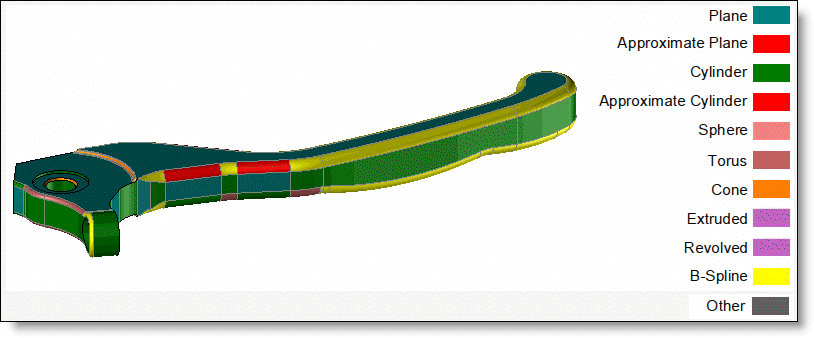
This command allows to quickly visualize the type of faces (planar, cylindrical, b-spline,...) through a color correspondence.
Creation stages / Use:
Click on the icon or choose the command Analysis > Analyze face type... from the drop down menu.
Select the shape to analyze.
Select a revolution axis if needed.
Validate with to display the result.
|
|
|
|
|
Once the command has been validated, it is possible to activate/deactivate de visualization of a face type by clicking on the corresponding color on the palette. |
Available Options:
Hide:
|
|
This option allows to hide the selected elements (it can helps to the selection of other shapes that could be hidden by the shapes already selected). |
Tolerance:
|
|
A face is considered as a given geometry type if it remains inside the limits of the given tolerance. |
Colors:
|
|
This option allows to modify the color used to identify each face type (plane, cylinder, B-Spline, ...). The type of face is indicated by the ParaSolid modeler. If a line is extruded, the face type will be Plane. If a B-spline is extruded, the face type will be Extruded. If you revolve a B-spline curve, the face type will be Revolved. Some ParaSolid faces have no equivalent in TopSolid like for example, offset or blend faces. In this case, their type will be Other. |
|
|